Animal Audio
PluginsStudioHabitatContact
Open the AppSign In
Sign Up
PluginsStudioHabitatContact
Open the AppSign In
Sign Up
DUCK
01 / 01
AA-001AVAILABLE NOW

VOLUME SHAPER

DUCK

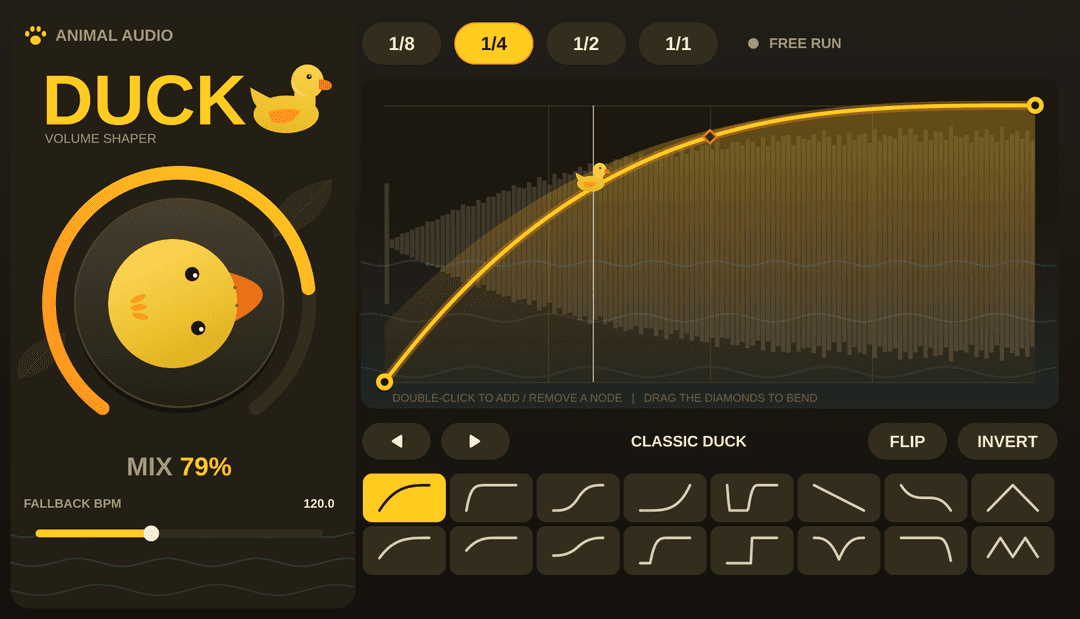
DUCK turns sidechain and volume motion into a tactile instrument. Draw envelopes, lock to the grid, or free-run for organic pumping that stays musical.

Download

Create a free account or sign in, then download for your platform.

No card required for DUCK. Sign up if you are new.

Mac build not published yet.

Windows build not published yet.

Installation steps

macOS · installer

  1. Download the Mac installer (.pkg) while signed in.
  2. Open it and walk through the installer (Continue → accept license → Install).
  3. Enter your Mac password when asked. Use Change Install Location… if you want a folder other than the default (default: all users at /Library/Audio/Plug-Ins/VST3; choose your home folder for a user-only install).
  4. When installation finishes, follow the on-screen note to rescan in Ableton.
  5. Add DUCK on an audio track as an audio effect.

The installer is signed and notarized by Animal Audio. If macOS or Chrome warns on download, you can still proceed — the file is new, not unsafe.

Windows · VST3

  1. Download the Windows zip while signed in.
  2. Unzip the folder.
  3. Right-click Install-Duck.ps1 → Run with PowerShell (installs to the system VST3 folder; approve the admin prompt if shown).
  4. Rescan plugins in your DAW.

Free sidechain volume shaper

DUCK is a free VST3 volume shaper for producers who want sidechain-style pumping without patching compressors and ghost tracks. Draw envelopes, sync to tempo, or run free for organic movement that stays musical in house, techno, hip-hop, and pop.

Download Mac and Windows builds from Animal Audio after a free sign up. Browse the rest on the homepage.
Common questions

Is DUCK free?
Yes. DUCK is a free volume shaper from Animal Audio. Create a free account on animal.audio to download Mac and Windows builds.
What format is DUCK?
DUCK ships as VST3 for macOS and Windows. Use it in Ableton Live and any DAW that loads VST3 effects from the system plug-in folders.
How do I install DUCK on Mac?
Sign in, download the Mac zip, unzip DUCK.vst3, and copy it to ~/Library/Audio/Plug-Ins/VST3/. In Ableton, enable VST3 system folders and rescan plug-ins.
How do I install DUCK on Windows?
79%
DUCK volume shaper plugin interface
Sign in, download the Windows zip, unzip DUCK.vst3, and copy it to C:\Program Files\Common Files\VST3\. Rescan plug-ins in your DAW.
Why do I need an account to download?
A free Animal Audio account lets us deliver signed builds and manage releases. No payment is required for DUCK.